Configuring and protecting your market making funds
A key aspect of a market making strategy is the proper allocation and protection of dedicated funds.
On OctoBot Market Making, several mechanisms are available to automate funds allocation and protection according to each market and unique user needs.
Funds allocation strategies
When configuring your Market Making bot, you have the ability to select a funds distribution and detailed budgets in the quote and base asset of the traded pair.
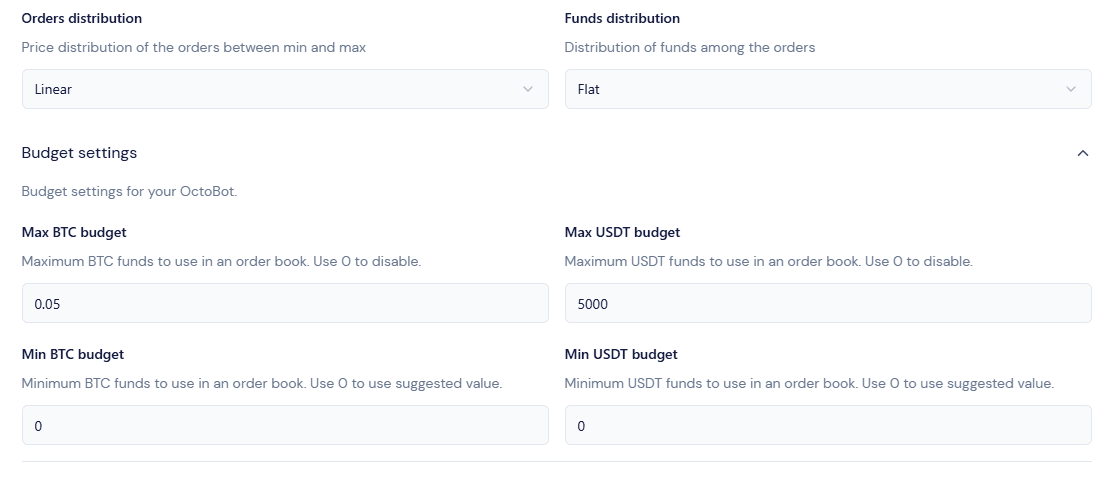
Funds distribution
A funds distribution defines the way your market making orders’ size is computed.

- A Flat distribution will create orders of constant quantity. This distribution is useful to greatly increase liquidity close to the current price.
- A Valley distribution will create orders with increasing quantity with distance from the current price. This distribution is better suited for markets with higher expected volatility as it leaves more room for price movement before the bulk of the market making capital is engaged.
- A Random distribution will create orders with unpredictable size between 80% and 120% of the average order size. This distribution is useful to avoid creating orders at the same price level and to make the market making strategy more resilient to price manipulation.
Budgets
Both minimum and maximum market making total budget can be configured for base and quote assets of each traded pair. This enables accurate funds management, allowing you to either:
- Let the system compute the ideal market making funds, based on your configuration and the recent trading activity of the exchange, within your own min and max boundaries
- Or pre-configure the exact amounts you wish to include in your market making orders, regardless of trading activity on this exchange.
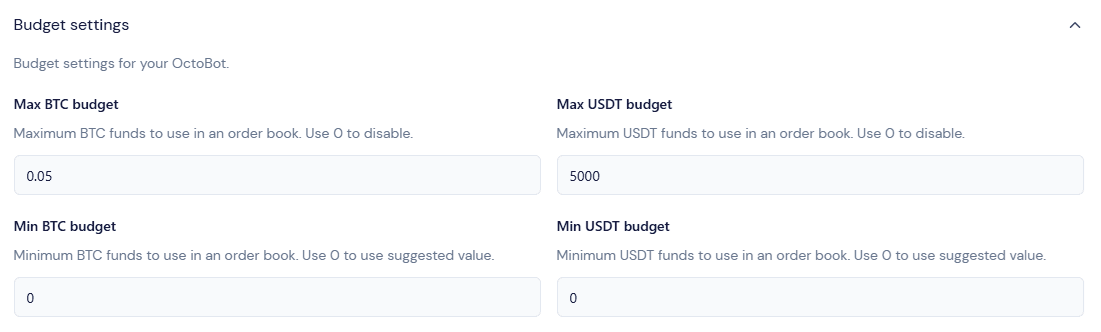
The ideal trading volume-based budget is automatically computed by the system and is used to create your market making orders in case no min or max budget is configured. This amount is re-evaluated on a regular basis and is based on a percent of your trading pair’s 24 hours trading volume on the target exchange and your market making configuration in order to offer an optimal liquidity for your market.
This means that a trading pair with a low 24h trading volume might only require a few thousand USDT budget to offer an optimal experience. On the other hand, a pair with millions in trading volume would require significantly more capital.
In order to have control over this budget, a minimum and maximum amount of each asset of the traded pair can be configured to always create an order book within your target budget.
Protip If you want to use a constant budget in your market making orders, just set the min and max value to the same value. Example: setting a min and max USDT value of 150 will always dedicate 150 USDT in your market making orders (+/- a few cents due to the exchange’s orders rules)
Funds protection mechanisms
Protecting your funds in a market making strategy is always a priority and OctoBot Market Making proposes mechanisms to automatically protect your funds against market manipulation and other abuses.
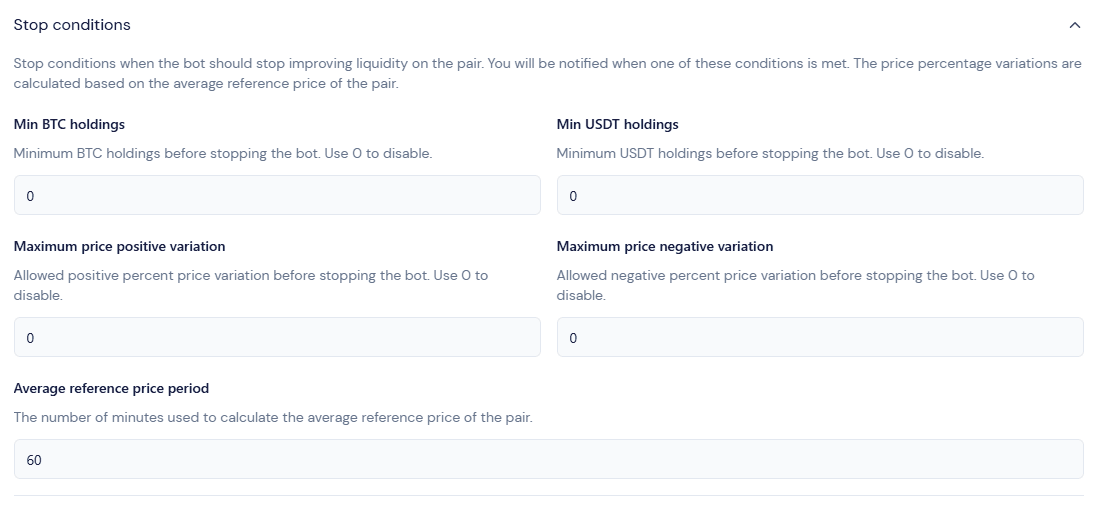
When configuring your strategy, you can add Stop conditions for each traded pair. When set, such conditions will instantly halt your market making strategy (by canceling all open orders) and stop the bot as an emergency measure to protect your capital if any condition is met.
Minimum holdings protection
Minimum total holding of the traded assets on your account can be configured to stop the market making strategy in case your account is running low on a certain coin.

Minimum holdings allow you to pre-configure a maximum spendable budget.
For example, with an exchange account holding 5000 USDT, setting a Min USDT holdings to 3000 will automatically stop the bot to protect the remaining 3000 USDT on the account in case too many buy orders end up being executed and the account is spending more USDT than expected.
Warning: configuring a minimum holding at a value inferior or equal to your account’s current holding will instantly trigger your stop condition and your bot won’t be able to properly start.
Volatility protection
Sometimes, crypto markets can be manipulated or abused. This is especially true for markets with lower trading volume and thin order books.
Volatility stop conditions are made to reduce the impact of those events as much as possible.
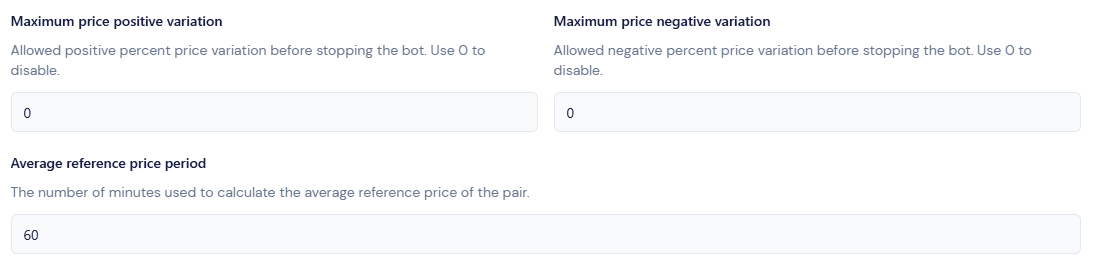
OctoBot Market Making makes it possible to stop a market marking strategy when the reference price of the strategy reaches a preconfigured volatility.
When enabled, market making can stop in case its reference price moves higher or lower than a threshold % of its average value over the past period.
Examples:
- Pump & dump protection: Setting a Maximum price positive variation of 20% over the past 60 minutes will make sure the market making strategy will not create an order book around a price that is 20% higher than the average of the maximum reference prices over the past 60 minutes.
In the event of a pump & dump manipulation of more than 20% of the price, the bot will detect it and stop itself in order not to be negatively affected by creating buy orders at the artificially pumped price. - Market crash protection: Using a Maximum price negative variation of 15% over the past 30 minutes will automatically stop all market making activity if the reference price goes lower than 85% of the average minimum prices of the past 30 minutes, effectively stopping re-creating buy orders in case of a sudden market crash.
When a stop condition is triggered
As soon as at least one of your strategy’s stop condition is met, your bot will:
- Stop creating new orders
- Cancel all its open orders
- Stop itself
- Send you an email notification detailing why it stopped and which condition was met
After a bot has been stopped because of a stop condition, it can always be restarted at your convenience. This is usually when your market is back to a normal state and market making should resume.
Hedging on a second exchange
OctoBot Market Making allows you to hedge your market making orders on a second exchange. This is useful to protect your funds when the market goes in a single direction.
When hedging is enabled, OctoBot Market Making will:
- Automatically create a sell order on the hedging exchange when a buy order is filled on the main exchange, and
- Automatically create a buy order on the hedging exchange when a sell order is filled on the main exchange.
As a result, your total (multi-exchange) portfolio will remain balanced, reducing inventory risk.
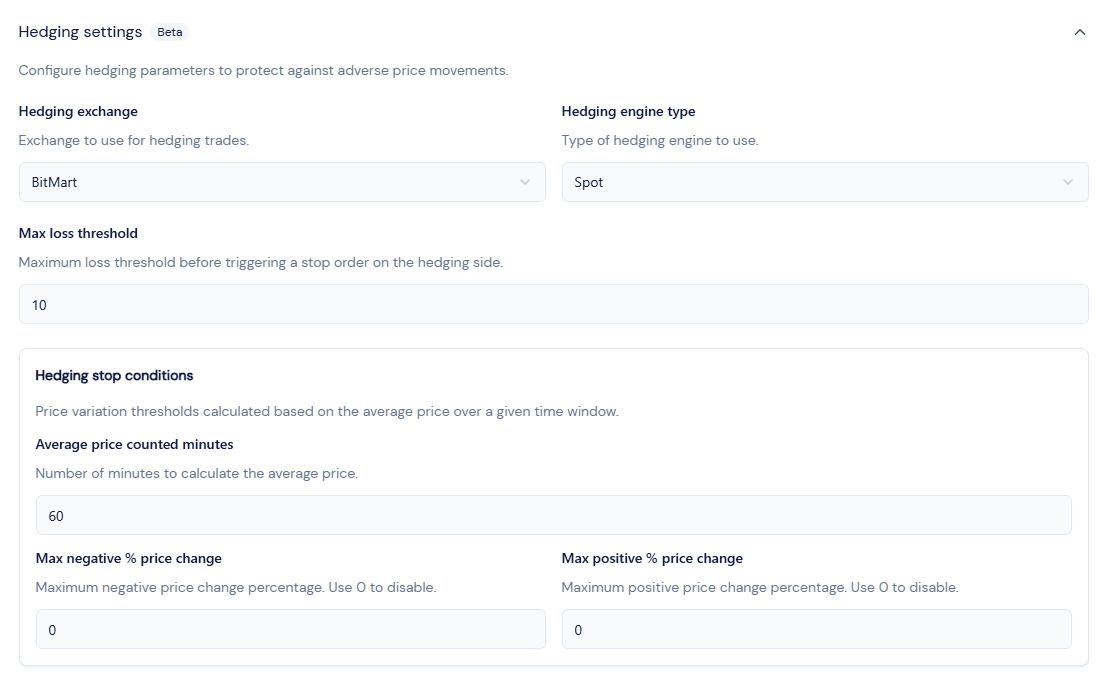
To add a hedging engine to your strategy:
- Add it to your connected accounts
- Select it in your hedging settings
- Hedging will automatically start with your bot.
Hedging stop conditions
Hedging can optionnally be automatically stopped in case the price of the traded pair moves too much in a single direction.
This is measured by the “Max negative % price change” and “Max positive % price change” values combined with the “Average price counted minutes” value.
For example, setting a “Max negative % price change” of 10% and an “Average price counted minutes” of 60 minutes will automatically stop the hedging engine if the price of the traded pair moves more than 10% in the last 60 minutes. Hedging will then resume when this condition is no longer met.
Leaving these values at 0 will disable the hedging stop conditions.
The hedging system is currently in beta. Please use it with caution.