Using formulas to configure your market making reference price
When configuring your market making strategy, the reference price defines how the algorithm will compute the up-to-date price that should be used as a basis to create its order book from.
OctoBot Market Making offers several ways to configure the reference price of your market making strategy, including:
- Using the price of your traded market on your exchange.
- Using the price of your traded market from other exchange(s).
- Forcing the price to a static value.
- Using a formula to dynamically compute the price.
Each of these methods can also be combined to create a more complex reference price configuration.
Selecting the best reference price source
Using the price of your traded market on your exchange
This is the simplest way to configure your reference price. It will use the local exchange current price of your traded market.
This option is necessary when your coin is listed on the local exchange only.
Otherwise, it’s usually better to use the price of your coin based on the exchange with the best liquidity for your market in order to leverage this optimal price for your market making strategy.
Using a price from another exchange

In this mode, the strategy will create its order book based on another exchange price. This is useful if another exchange usually has a more up-to-date price than your target exchange.
When providing liquidity on an exchange for a trading pair that has an equivalent pair on a more liquid exchange, this mode is the best choice.
Combining prices from multiple exchanges
In some cases, no single exchange has a significantly better liquidity than others and no obvious choice is available. In this case, you can combine prices from multiple exchanges to compute the reference price.
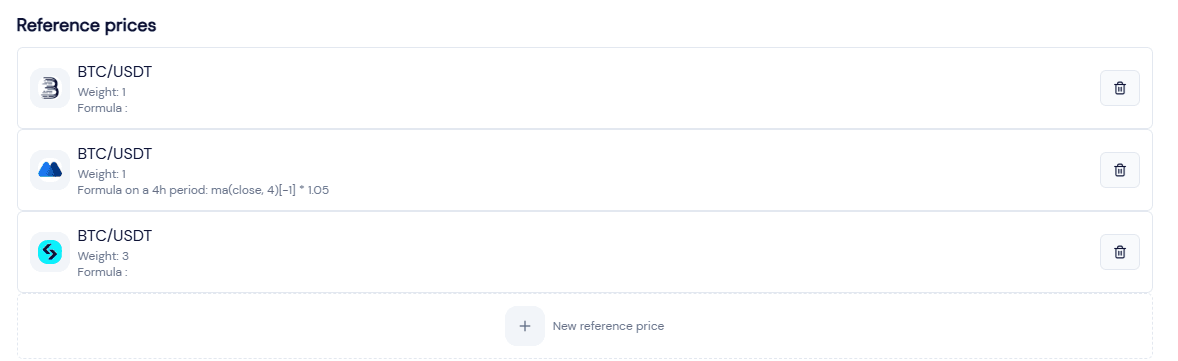
You can also assign a weight to each exchange to give more importance to the price of one exchange over the others.
The final reference price will be the weighted average of the prices from all selected reference prices.
Configuring your price with a formula
Forcing a static price
In specific cases, you may want to force a static price for your reference price. This is useful if you wish to lock your market price at a pre-configured value.
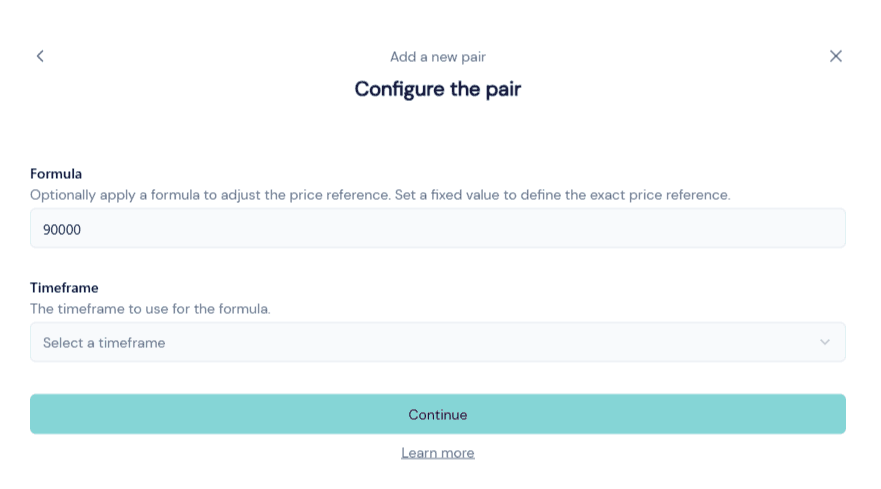
You can enter the value of the static price in the Formula field.
Dynamically computing the price
In some cases, you may want to use a formula to dynamically compute the price of your reference price. This is useful if you wish to use a different value than the raw price from an exchange.
For example, you might want to use a formula to compute your market making reference price from:
- An average value of the close price of this market over the past 12 hours.
- A volume-weighted average price of this market over the past 3 hours.
- The average price + 5% in order to give more upside potential to market.
- A mix of all the above.
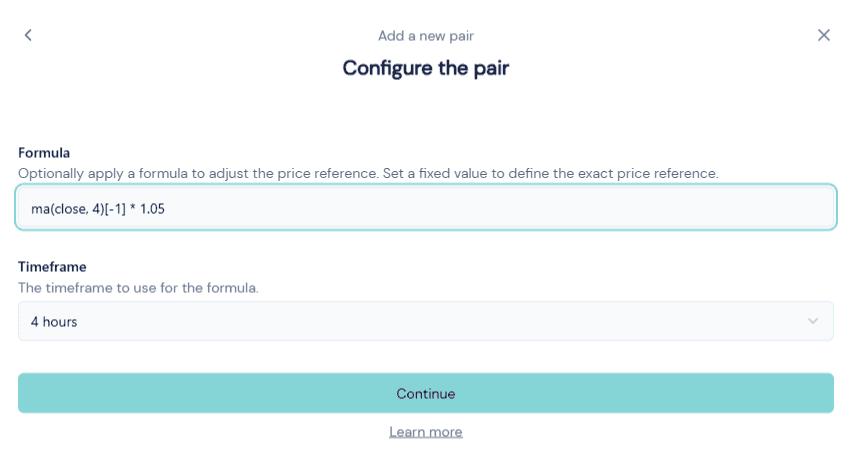
Example: 4 hours moving average price over 4 periods + 5%: (ma(close, 4)[-1] * 1.05)
Warning: the formula system is still in beta. Please report any issues you encounter and feel free to ask the support team for any questions you may have or requests for new keywords.
Formula keywords
The following keywords are available to use in your formula and can be combined to create any required formula.
| Keyword | Example | Details |
|---|---|---|
price | price('ETH/USDT') | The most up-to-date price of the given market. |
close | close[-1] | The close price of the current 1h candle of the market. |
open | open[-1] | The open price of the current 1h candle of the market. |
high | high[-3] | The high price of the n-2 1h candle of the market. |
low | low[-1] | The low price of the current 1h candle of the market. |
volume | volume[-2] | The volume of the n-1 1h candle of the market. |
time | time[-1] | The timestamp value of the open time of the current 1h candle of the market. |
ma | ma(close, 12)[-1] | Simple moving average of the close price over the past 12 hours. |
ema | ema(open, 24)[-1] | Exponential moving average of the open price over the past 24 hours hours. |
vwma | vwma(close, volume, 4)[-1] | Volume weighted moving average of the close price over the past 4 hours. |
rsi | rsi(close, 14)[-1] | Relative strength index of the close price over the past 14 hours. |
max | max(close[-1], open[-1]) | The max value between the close and open prices. |
min | min(ma(close, 12)[-1], ema(open, 24)[-1]) | The min value between the 12h moving average close price and the 24h exponential moving average open price. |
mean | mean(close[-1], open[-1], high[-1], low[-1]) | The average value between the close, open, high and low prices. |
round | round(ma(close, 12)[-1], 2) | Round the result of the moving average of the close price over the past 12 hours to 2 decimal. |
floor | floor(close[-1]) | Floor the latest close price to the nearest integer. |
ceil | ceil(close[-1]) | Ceil the latest close price to the nearest integer. |
abs | abs(close[-1] - open[-1]) | The absolute value of the difference between the latest close price and the latest open price. |
sin | sin(3.14) | The sine of the given numeric operand (in radians). |
cos | cos(3*pi) | The cosine of the given numeric operand (in radians). |
oscillate | oscillate(1000, 10, 60) | Returns the value of parameter 1 with a time-based oscillating component added. The oscillation uses a sine wave using the maximum percentage of the base value (parameter 2) and a period in minutes (parameter 3). oscillate(1000, 10, 60) returns a value between 900 and 1100 over a 60 minutes period. |
abs | abs(close[-1] - open[-1]) | The absolute value of the difference between the latest close price and the latest open price. |
if | 100 if close[-1] > open[-1] else (90 + 1) | 100 if the latest close price is greater than the latest open price, otherwise 91. |
The formula syntax is based on the Python syntax. Additionally to the above keywords, all base operators (such as +, -, *, /, [], (), >, <, >=, <=, and, or) are supported.
Important: the algorithm is always expecting a single numerical value as the result of the formula. This is the reason why many examples use the [-1] operator in order to select the last value of a series. If the formula returns a non-numeric value, the reference price won’t be computed and your bot will not execute its market making strategy.